
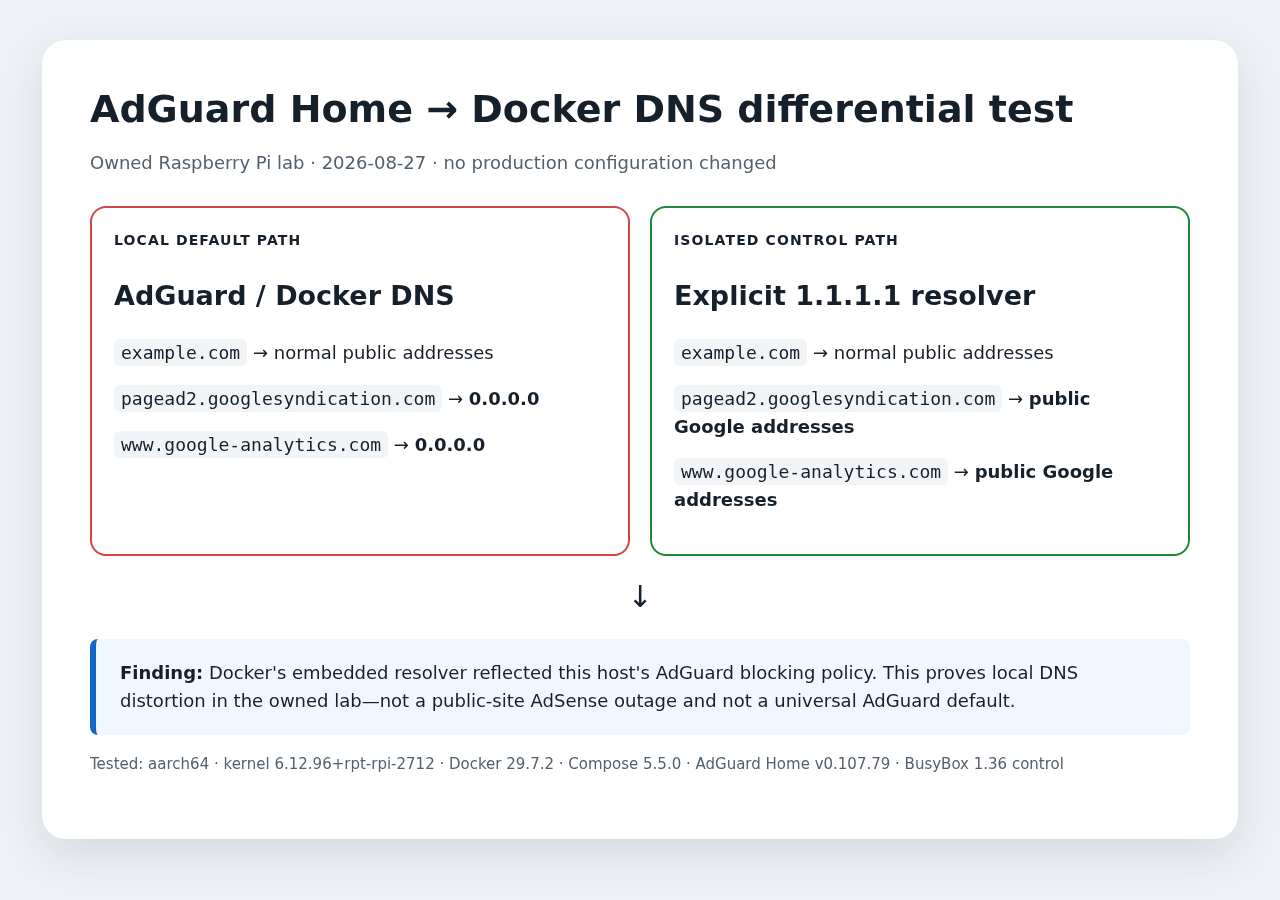
Direct answer: if a Docker container resolves an AdSense or GA4 hostname to 0.0.0.0 while an isolated control resolver returns public addresses, the failure is in the local DNS policy path—not proof that Google or the public website is down. This Raspberry Pi lab reproduced that split through AdGuard Home and Docker’s embedded resolver without changing production configuration.
Tested environment and scope
- Last reproduced: August 27, 2026
- Fixture:
bb-lab-adguard-docker-dns-20260827 - Host: Raspberry Pi,
aarch64, kernel6.12.96+rpt-rpi-2712 - Docker: Engine
29.7.2, Compose5.5.0 - AdGuard Home:
v0.107.79, host network - Container controls: existing WordPress/PHP
8.3.33and disposablebusybox:1.36 - Production changes: none
What the differential test proved
A read-only port check confirmed TCP/UDP listeners on port 53, and the listener cgroup matched the owned AdGuard Home container. A preserved two-service Compose fixture then reproduced both states on the same Docker network: inherited DNS returned 0.0.0.0/::, while the isolated service-level dns: 1.1.1.1 control returned public Google addresses. Both disposable services were removed and the residual container check was empty.
| Path | Control domain | AdSense hostname | GA4 hostname |
|---|---|---|---|
| Host default resolver via AdGuard | Public addresses | 0.0.0.0 | 0.0.0.0 |
Docker embedded DNS 127.0.0.11 | Not needed for the branch | 0.0.0.0 | Not needed for the branch |
| Disposable same-network container, default DNS | Not needed for the branch | :: and 0.0.0.0 | Not needed for the branch |
Explicit 1.1.1.1 control | Public addresses | Public Google addresses | Public Google addresses |
Docker’s embedded resolver reflected the host’s AdGuard blocking policy in this lab. The same blocked answer appeared in an existing application container and a disposable container on the same network. Changing only the resolver in the disposable control changed the answer to public Google addresses.
Safe inspection sequence
Start with read-only comparisons. Do not disable AdGuard, edit filter rules, or change the public site just to determine which layer is answering.
# 1. Prove ordinary DNS still works
dig +short example.com A

# 2. Compare the local default path with an isolated control
dig +short pagead2.googlesyndication.com A
dig @1.1.1.1 +short pagead2.googlesyndication.com A

# 3. Inspect Docker's resolver without editing the container
docker exec YOUR_CONTAINER sh -lc \
  'grep -E "^(nameserver|search|options)" /etc/resolv.conf'
docker exec YOUR_CONTAINER getent ahostsv4 \
  pagead2.googlesyndication.com

# Confirm what owns port 53, then match the cgroup/container ID
ss -tulpen 'sport = :53'

# 4. Compare disposable containers on the same Docker network
docker run --rm --network YOUR_NETWORK busybox:1.36 \
  nslookup pagead2.googlesyndication.com
docker run --rm --network YOUR_NETWORK --dns 1.1.1.1 \
  busybox:1.36 nslookup pagead2.googlesyndication.com
QA boundary: an explicit external resolver is a temporary diagnostic control, not a recommendation to bypass a network owner’s policy or weaken normal protection. Use it only in an isolated container or approved test client. Never click ads during QA.
How to read the outcomes
| Observed outcome | Most useful next check | Do not conclude |
|---|---|---|
| Control domain works; ad/analytics hostname is sinkholed only locally | Review the relevant AdGuard query log and matched rule in the authorized admin UI | The public website or Google service is down |
| Both local and isolated control fail | Check egress, upstream resolver reachability, and time-correlated service status | AdGuard is necessarily the cause |
| Host resolves normally but one container fails | Inspect that container’s /etc/resolv.conf, network membership, and explicit DNS settings | All Docker networks are affected |
| Browser tracking is absent despite normal DNS | Check consent state, browser protection, request status, and the correct measurement endpoint | A successful DNS lookup proves analytics processing |
Popular fixes that this test rejects
- “Disable AdGuard.” Too broad. The ordinary control domain worked, and normal protection may be intentional.
- “Set every container to 1.1.1.1.” That changes policy for every workload and hides the actual filter decision. Keep the bypass isolated to diagnosis unless a deliberate network-policy change is approved.
- “The WordPress container is broken.” A disposable BusyBox container reproduced the same blocked answer.
- “AdSense is down for visitors.” Public visitors normally do not use this private resolver. Test the public page from an independent network before making a site-wide claim.
Verification and rollback
A safe diagnosis is complete when the same hostname produces the expected difference across the local and isolated control paths, the ordinary control domain still resolves, and no persistent configuration has changed. One-command containers should use --rm; a Compose fixture should be removed with docker compose down --remove-orphans and followed by a residual container check. In this reproduction there was nothing to roll back; the BusyBox image may remain in the local image cache.
What this page does not claim
- It does not claim that every AdGuard Home installation blocks the same hostnames.
- It does not claim that public visitors are affected.
- It does not claim that DNS filtering explains low Google organic traffic, low ad impressions, or low AdSense earnings.
- It does not treat a GA4 request or a
2xxMeasurement Protocol response as proof that data was processed.
Sources and refresh policy
- AdGuard Home: Getting started and official Docker image
- Docker Engine networking overview
- Google Analytics Measurement Protocol reference
- Google AdSense required-content guidance
Refresh trigger: retest when a relevant AdGuard Home, Docker Engine/Compose, Raspberry Pi OS/kernel, or Google collection-host behavior changes. Otherwise review this fixture within 90 days. Corrections should preserve the original tested-version record rather than silently rewriting it.